
Blog Filter
We will guide you on how to create the Blog filter by Article tag
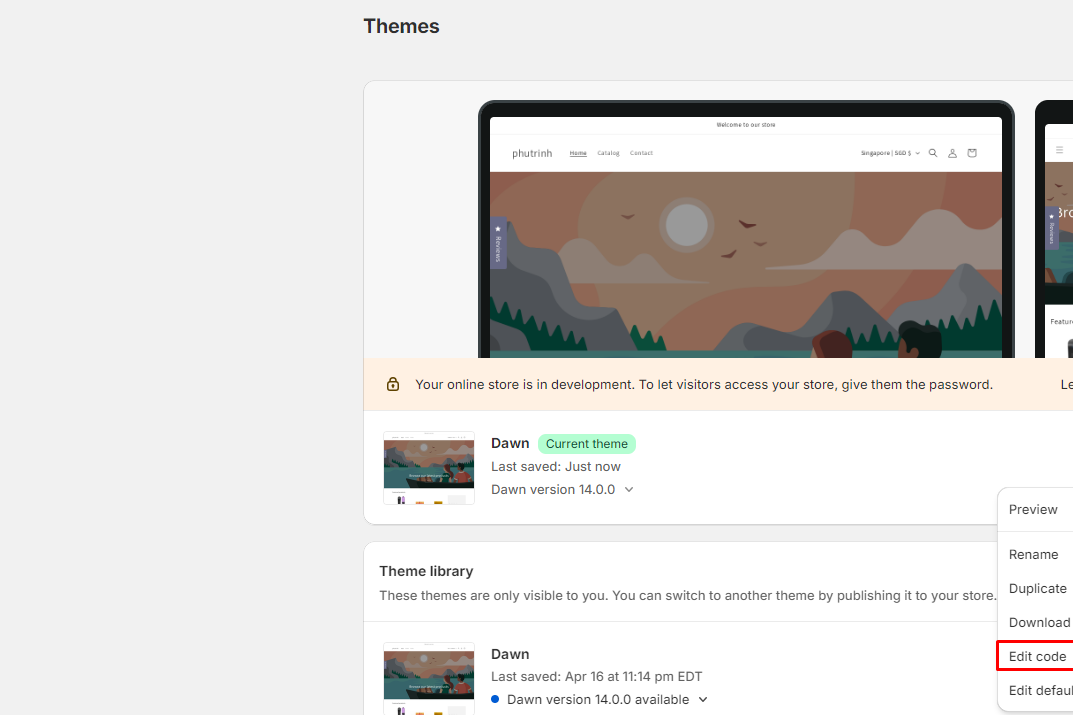
From Shopify Admin Dashboard > Online Store > Themes > ... button > Edit code
Search or Scroll the file list on the left to find the file name "main-blog.liquid" within Snippets. (Depending on your store's theme, it will have different files. We will guide based on Dawn theme structure) .
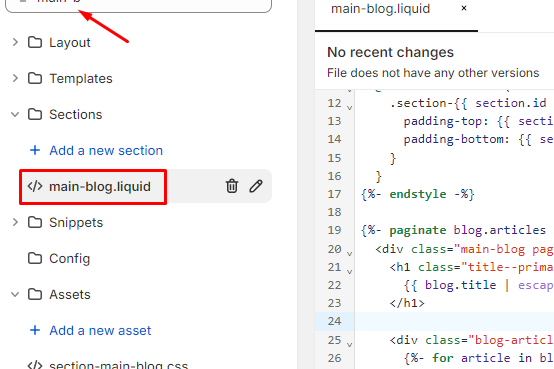
Add the code below to the line#24
code
{% if blog.tags.size > 0 %}
      <div class="blog-filter">
        <div class="list-group">
          <ul id="BlogTagFilter" class="tag-list" style="display: flex; gap: 20px;">
            <li>Filter by:</li>
            {% if request.path contains 'tagged' %}
              {% assign filter_name = request.path | split: 'tagged/' %}
              {{ filter_name[1] | replace: '-', ' ' | capitalize }}
            {%  else %}
              <li>
                <a href="{{ blog.url }}" class="button">
                  {{ 'All Topics' }}
                </a>
              </li>
              {% for tag in blog.all_tags %}
              <li>
                <a href="{{ blog.url }}/tagged/{{ tag | handleize }}" class="button">
                {{ tag }}
                </a>
              </li>
              {% endfor %}
          {% endif %}
          </ul>
        </div>
      </div>
{% endif %}Also you can add CSS style, it's additional
css
<style>
  .list-group {
    text-align: center;
  }
  ul#BlogTagFilter {
	list-style: none;
	padding-top: 10px;
	}
  ul#BlogTagFilter li {
	display: inline;
    margin: 5px;
	}
</style>
If you want show this tag on each Article card on Blog page, let use the code:
code
<ul>
      {% for tag in article.tags %}
        <li><a href="{{ blog.url }}/tagged/{{ tag | handleize }}" class="button">{{ tag }}</a></li>
      {% endfor %}
</ul>
Blog Search bar
Using below code
css
<form method="get" action="/search">
    <input type="hidden" name="type" value="article" />
    <input type="text" name="q" />
    <input  type="submit" value="Search" />
</form>
Tags