These new features aim to simplify theme development by allowing developers to build page structures directly in Liquid while making storefront updates more efficient. Although still in preview, they offer a glimpse into the future of Shopify theme architecture.
What Are Liquid Block and Partial Tags?
Traditionally, Shopify themes rely on a combination of JSON templates, sections, and Liquid files to define page layouts. While this architecture is flexible, it often requires developers to work across multiple files for a single page.
The new Developer Preview introduces two new Liquid tags that help streamline this workflow.
{% block %}
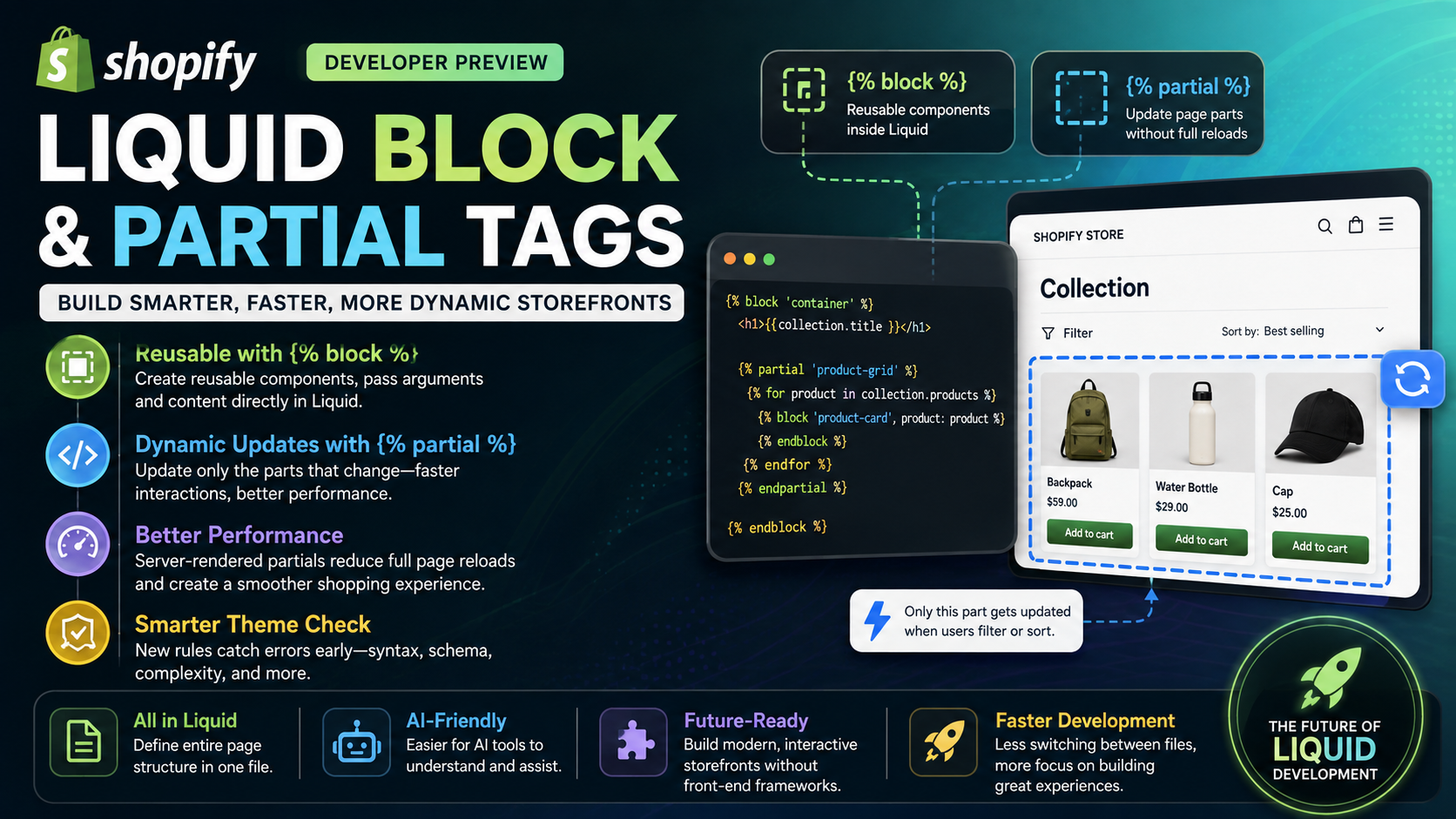
The block tag allows developers to create reusable UI components directly within Liquid templates.
Instead of managing blocks through JSON templates, developers can render reusable components while passing arguments and nested content, making page structures more readable and easier to maintain.
For example, a product card can be rendered multiple times across a collection page without relying on traditional section schemas.
{% partial %}
The partial tag is designed for server-rendered fragments that can be updated independently.
This is especially useful for interactive storefront experiences such as:
Rather than refreshing the entire page after a customer changes a filter or sort option, Shopify can render only the required partial and replace that section of HTML, resulting in a faster and smoother browsing experience.
Why This Matters for Shopify Developers
These additions represent one of the biggest improvements to Liquid in recent years.
Simpler Theme Architecture
Developers can define more of a page directly in Liquid without jumping between JSON templates, sections, and snippets.
This creates a more intuitive project structure that is easier to understand and maintain.
Better Code Reusability
The new block tag encourages reusable components, reducing duplicated code and improving consistency across themes.
Improved Performance
With partial, only the necessary portions of a page need to be rendered during dynamic interactions, reducing unnecessary page reloads and creating a more responsive storefront.
AI-Friendly Development
As AI coding assistants become increasingly popular, having an entire page structure contained within Liquid makes it easier for tools like ChatGPT and GitHub Copilot to understand project context and generate accurate code suggestions.
Theme Check Gets Smarter
Alongside these new Liquid features, Shopify has enhanced Theme Check with additional validation rules.
The updated checks can detect issues such as:
These improvements help developers identify problems earlier in the development process and maintain higher-quality themes.
Will Existing Themes Continue to Work?
Yes.
Shopify has confirmed that existing theme architecture remains fully supported.
This means:
The new block and partial tags are optional enhancements designed for future theme development rather than replacements for the current system.
A Practical Example
Imagine a collection page containing dozens of products.
With the traditional approach, changing a filter often requires rebuilding or reloading a large portion of the page.
Using the new architecture, developers can wrap the product grid inside a partial while rendering each product card as a reusable block. When customers apply a filter or change the sorting order, Shopify only re-renders the product grid instead of the entire page.
This results in:
Is It Available Now?
Not for production stores yet.
The new Liquid tags are currently available as part of Shopify's Developer Preview, allowing developers to experiment and provide feedback before the features become generally available.
Since this is still a preview, Shopify notes that the syntax and JavaScript APIs associated with partial may change before the official release.
Final Thoughts
The introduction of Liquid Block and Partial tags marks an important step toward a more modern and efficient Shopify development experience.
By enabling reusable components, partial server rendering, and cleaner theme organization, Shopify is making it easier to build scalable storefronts while improving both developer productivity and storefront performance.
Although these features are still in preview, they offer a promising direction for the future of Shopify themes. Developers interested in staying ahead of the curve should start experimenting with the new architecture in a Development Store and prepare for the next evolution of Liquid development.